Racing clusters with cluv submit first
cluv submit normally takes a single cluster name. Pass first
instead, and cluv submits the job to every cluster you're connected to, waits until one
of them actually starts running, and cancels the rest:
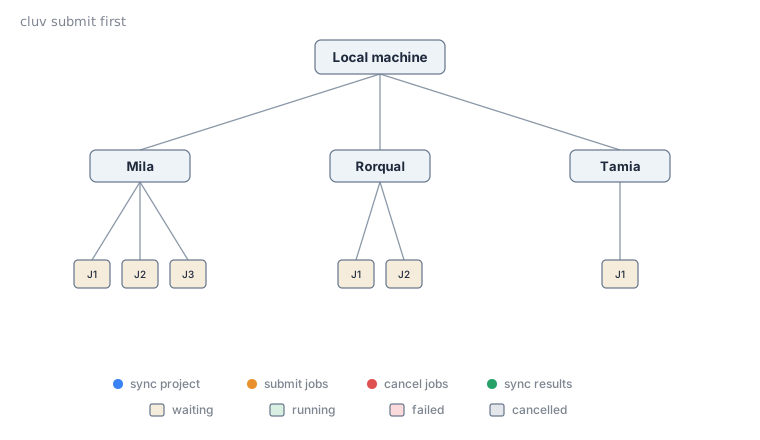
Queue times vary a lot between clusters (and between allocations on the same cluster) depending on
who else is using them right now. If you don't especially care where a job runs, cluv submit
first lets cluv figure out which cluster happens to be least busy at that moment.
Which clusters are raced
first submits to every cluster you currently have an active SSH connection to (see cluv
login), plus the cluster you're running from if you're already on
one. It does not connect to clusters you haven't logged into, and it skips disabled
clusters.
cluv login mila narval # connect to the clusters you want considered
cluv submit first job.sh # races mila and narval
A cluster with more than one job configuration (a list of sbatch_args, see "Multiple job
configurations on the same cluster")
contributes one submission per configuration to the race. cluv submit first and a per-cluster
sbatch_args list compose, so a cluv submit first with two clusters that each have two
configurations races four jobs at once.
How the race works
The race between clusters is implemented in three steps:
- cluv builds a submission for every connected cluster (and every job configuration on each), and syncs the project to all of them.
- Every submission is sent to
sbatch, and cluv polls the status of every job until one leaves thePENDINGstate. - As soon as one job starts running, cluv cancels every other submission.
A live table tracks every submission while this happens:
$ cluv submit first scripts/job.sh -- python main.py --lr 0.01
                                    Submitting jobs...
┏━━━━━━━━━┳━━━━━━━━┳━━━━━━━━━━━┳━━━━━━━━━━━━━━━━━━━━━━━━━━━━━━━━━━━━━━━━━━━━━━━━━━━━┓
┃ Cluster ┃ Job ID ┃ Status    ┃ Command                                            ┃
┡━━━━━━━━━╇━━━━━━━━╇━━━━━━━━━━━╇━━━━━━━━━━━━━━━━━━━━━━━━━━━━━━━━━━━━━━━━━━━━━━━━━━━━┩
│ mila    │ 9001   │ PENDING   │ bash --login -c '(...) --gpus=1 -- python main.py' │
│ narval  │ 4522   │ RUNNING   │ bash --login -c '(...) --gpus=1 -- python main.py' │
└─────────┴────────┴───────────┴────────────────────────────────────────────────────┘
Successfully submitted job 4522 on cluster narval.
Once a job is running, cluv reports which cluster it landed on (narval here) exactly as it would
for a normal single-cluster submission. You can then use cluv sync to fetch results from that
cluster, once the job is done.
Note
Cancelling the cluv submit first command (e.g. with Ctrl-C in your terminal) during the wait
for a running job will cancel all submissions.
Note
The sync step is asynchronous for all clusters, so you don't have to wait for the slowest cluster to finish syncing before being able to submit jobs.
Scripting against the result
With --parsable, cluv prints only <cluster>:<job_id> for the job that won the race (instead of
just <job_id> for a single-cluster submission), and suppresses everything else: